Fix Owner on Relation for PostgreSQL Triggers in n8n
Introduction
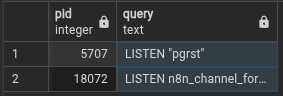
We’re talking about this:

Since you may NOT want to set another user as table/relation owner, the only way to bypass the bug preventing workflow creation is to use Channels.
Before You Start
For this example, I will show you how to create a trigger and channel for the user n8n_user while connected as admin.
Before proceeding, decide on the name of each object:
- Trigger Name
- Function Name
- Channel Name
All names must be descriptive to clearly indicate their purpose. This prevents accidental deletion in case someone finds them unclear and suspects they should be removed.
For this example, I’ll use:
- Trigger Name ⇒
n8n_trigger_for_xxx - Function Name ⇒
n8n_trigger_function_for_xxx - Channel Name ⇒
n8n_channel_for_xxx - Target Table (“relation”) ⇒
YOUR_TABLE - SQL User ⇒
n8n_user
Create a Function
-- FUNCTION: public.n8n_trigger_function_for_xxx()

-- DROP FUNCTION IF EXISTS public.n8n_trigger_function_for_xxx();

CREATE OR REPLACE FUNCTION public.n8n_trigger_function_for_xxx()
    RETURNS trigger
    LANGUAGE 'plpgsql'
    COST 100
    VOLATILE NOT LEAKPROOF
AS $BODY$
 begin perform pg_notify('n8n_channel_for_xxx', row_to_json(new)::text); return null; end;
$BODY$;

ALTER FUNCTION public.n8n_trigger_function_for_xxx()
    OWNER TO n8n_user;
Create a Trigger
Note that this trigger only works on INSERT operations:
-- Trigger: n8n_trigger_for_xxx

-- DROP TRIGGER IF EXISTS n8n_trigger_for_xxx ON public.YOUR_TABLE;

CREATE OR REPLACE TRIGGER n8n_trigger_for_xxx
    AFTER INSERT -- Trigger after INSERT
    ON public.YOUR_TABLE
    FOR EACH ROW
    EXECUTE FUNCTION public.n8n_trigger_function_for_xxx();
Triggers can be customized extensively according to the documentation.
Add Channel to n8n
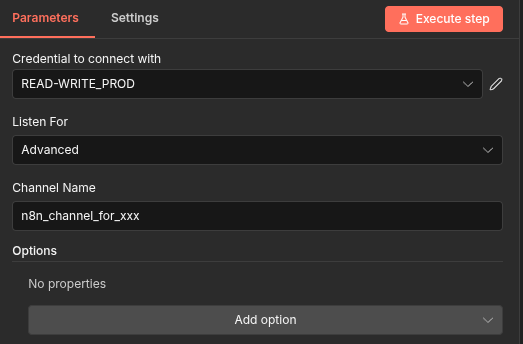
Click Execute Step to initialize channel listening. You can also test it at this point.
Verify the Channel
SELECT pid, query
FROM pg_stat_activity
WHERE query LIKE 'LISTEN%';
You should now see it listed, confirming that it’s working!